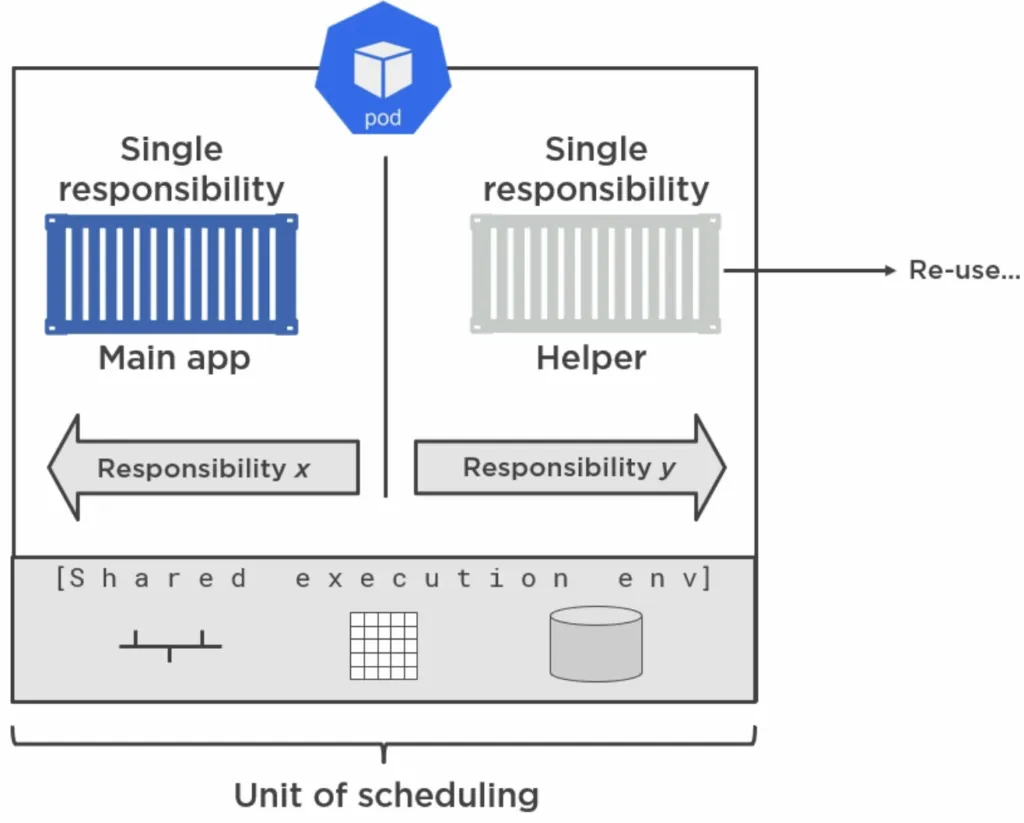
A classic example of multi container pods is when you have your Main app Container separated from a Container that has helper code. That way you separate responsibility and the Helper Container can be reused in other pods.
Multi Container patterns
Depending on the role of each container in a Pod, best practices (or design patterns) emerged. All patterns presented here are based on a pattern called Sidecar, which is simply having two Containers in one Pod: A Main Container and a Sidecar Container.
We can further specify whether the Sidebar Container has to run to completion before(!) the Main Container starts. If yes, then we call this an **Init Container **or Init Pattern. If not, both app containers are running concurrently and we call it Sidecar pattern.
Init Pattern
One use case for this pattern is to have the Sidecar pull down code from a git repository initially(!) and only after that is done, the web server Container will start using that code.
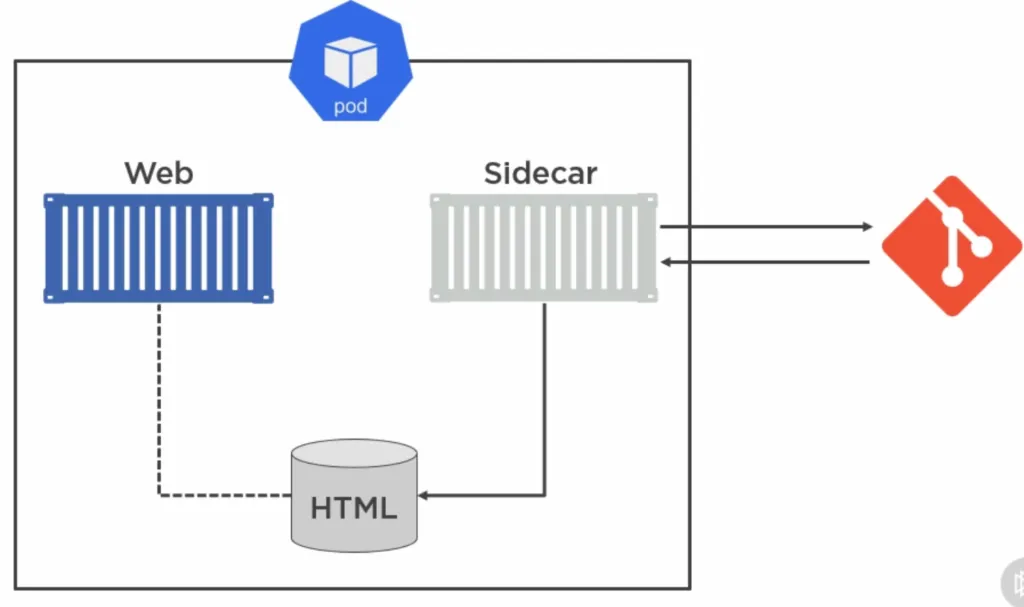
To make this happen we have to configure the Pod accordingly. Kubernetes even has a special configuration property initContainers for that:
apiVersion: v1kind: Podmetadata: name: git-syncer labels: app: git-syncerspec: initContainers: - image: k8s.gcr.io/git-sync:v3.1.5 name: init-sync-ctr volumeMounts: - name: html mountPath: /tmp/git env: - name: GIT_SYNC_REPO value: https://github.com/your-username/your-repo.git - name: GIT_SYNC_BRANCH value: master - name: GIT_SYNC_DEPTH value: "1" - name: GIT_SYNC_DEST value: "html" - name: GIT_SYNC_ONE_TIME # only get the git files initially and then quit value: "true" containers: - image: nginx name: web volumeMounts: - name: html mountPath: /usr/share/nginx volumes: - name: html emptyDir: {}---apiVersion: v1kind: Servicemetadata: name: git-syncerspec: selector: app: git-syncer ports: - port: 80 type: LoadBalancerKubernetes runs those Init Containers in order and sequential (not parallel) and guarantees that they are run before the Main Container.
But what if we want to continue to update our running app, even after the initial git sync? Well, we create a similar configuration and put them in a (non-init) sidecar container:
apiVersion: v1kind: Podmetadata: name: git-syncer labels: app: git-syncerspec: containers: - image: nginx name: web volumeMounts: - name: html mountPath: /usr/share/nginx/ - image: k8s.gcr.io/git-sync:v3.1.5 name: init-sync-ctr volumeMounts: - name: html mountPath: /tmp/git env: - name: GIT_SYNC_REPO value: https://github.com/your-username/your-repo.git - name: GIT_SYNC_BRANCH value: master - name: GIT_SYNC_DEPTH value: "1" - name: GIT_SYNC_DEST value: "html" volumes: - name: html emptyDir: {}---apiVersion: v1kind: Servicemetadata: name: git-syncerspec: selector: app: git-syncer ports: - port: 80 type: LoadBalancerAnother use case is if you want to prepare environment variables or wait for the availability of a service before the Main Container executes. In the following example we execute a command that continuously looks up (1 seconds intervals) if the service my-service is available:
apiVersion: v1kind: Podmetadata: name: ps-init labels: app: initializerspec: initContainers: - name: init-ctr image: busybox command: ['sh', '-c', 'until nslookup my-service; do echo waiting for my-service; sleep 1; done; echo Service found!'] containers: - name: web-ctr image: myrepo/web-app:1.0 ports: - containerPort: 8080If any Init Container fails, the pod restarts (unless restart policy it set to ‘never’) and the Init Containers run again! That’s why it is important that your init container are idempotent, meaning they should have the same predictable outcome every time they are started. Keep resource limits low for Init Containers.
Service Mesh pattern
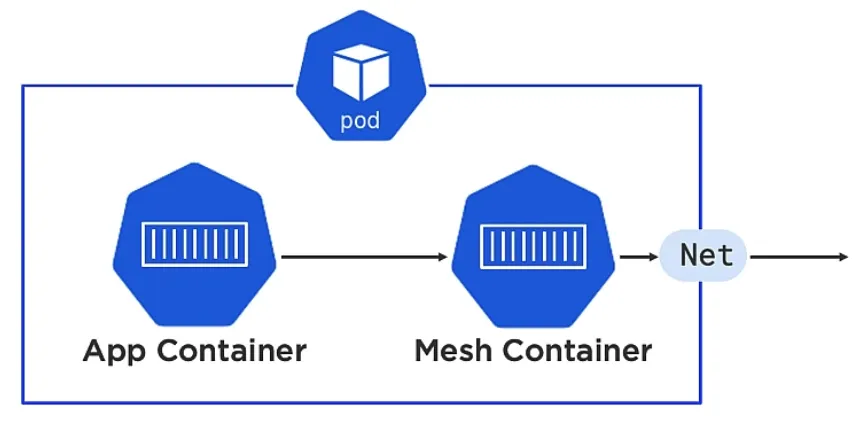
Service Mesh pattern is another Sidecar pattern. It serves as a Pod’s single entry point. It allows you to add additional features/services like monitoring, encrypting, telemetry, filtering, logging of your Pod.
Adapter pattern
The Adapter pattern takes non standard output and transforms it to standardised output via a Adapter Container, so that an External system can process it.
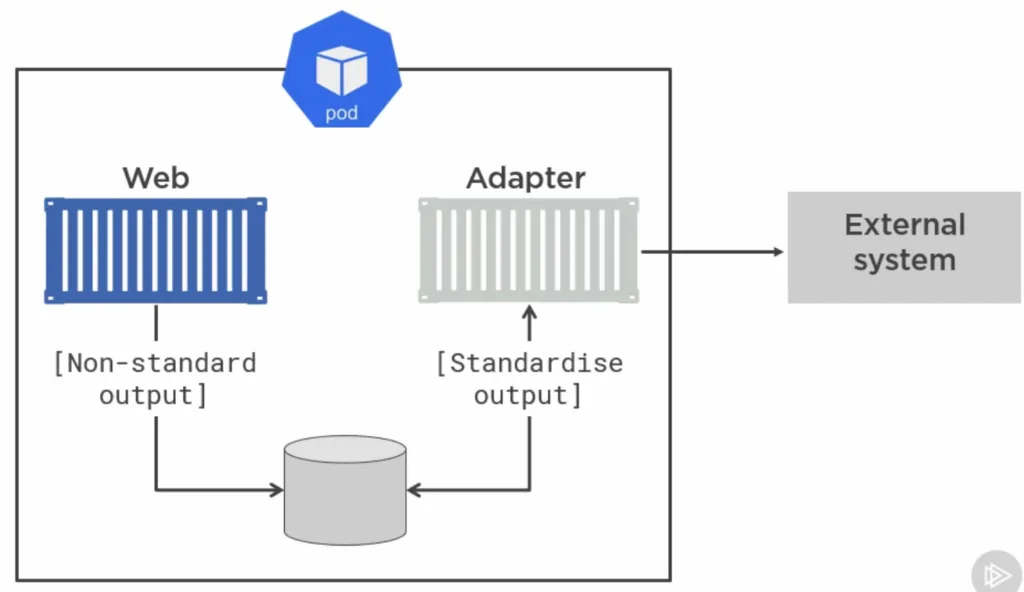
For example, Prometheus is a monitoring tool that uses this pattern.
Ambassador pattern
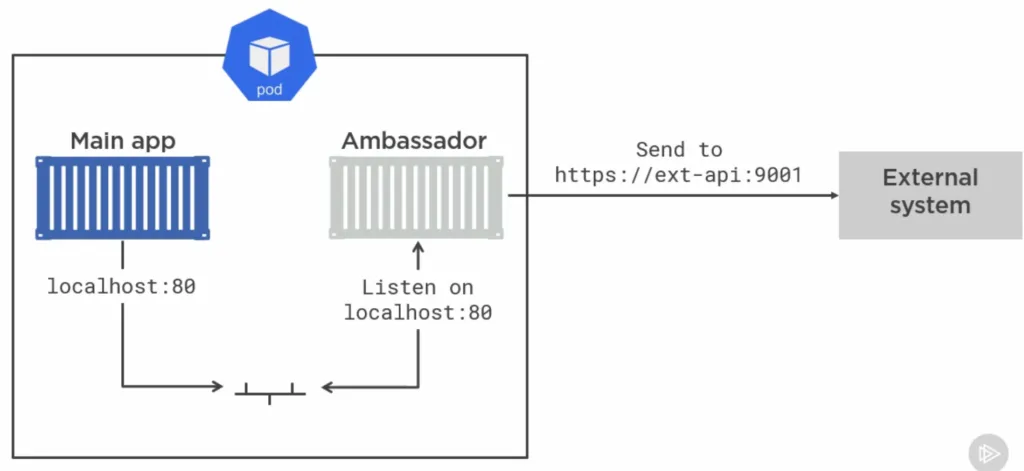
The Ambassador pattern proxies traffic from the main container to an external system: