Usage: docker container COMMAND
Commands: ls List containers create Create a new container rm Remove one or more containers rename Rename a container
start Start one or more stopped containers restart Restart one or more containers stop Stop one or more running containers kill Kill one or more running containers prune Remove all stopped containers
run Run a command in a new container exec Run a command in a running container cp Copy files/folders between a container and the local filesystem
inspect Display detailed information on one or more containers logs Fetch the logs of a container port List port mappings or a specific mapping for the container
top Display the running processes of a container pause Pause all processes within one or more containers unpause Unpause all processes within one or more containers
attach Attach local standard input, output, and error streams to a running container commit Create a new image from a container's changes diff Inspect changes to files or directories on a container's filesystem export Export a container's filesystem as a tar archive stats Display a live stream of container(s) resource usage statistics update Update configuration of one or more containers wait Block until one or more containers stop, then print their exit codesStart/Run a container from an image
# Start/Run container from an image (container will get random name and default ports)docker run docker/getting-started
# Start/Run container from an image and specify container namedocker run --name myapp docker/getting-started
# Start/Run container from an image on specified portsdocker run -p 80:80 docker/getting-started
# Start/Run container from an image in the background (detached)docker run -d docker/getting-started
# Start/Run container from an image detached, with ports, name and commanddocker run -dp 80:80 --name myapp docker/getting-started /bin/bash# ordocker container run -dp 80:80 --name myapp docker/getting-startedList containers (also get their ID)
# list running containersdocker ps
# list all containers, including those not currently runningdocker ps -aStarting already existing container
docker start my-containerStopping container
# Stop specificdocker stop <the-container-id>
# Stop all containersdocker stop $(docker ps -a -q)Removing containers
# Remove specific container (if stopped)docker rm <the-container-id>
# Remove specific container (if running)docker rm -f <the-container-id>
# Remove all containers including volumesdocker rm -vf $(docker ps -a -q)Executing commands in container
# Runs command in containerdocker exec -it <mysql-container-name or id> mysql -p
# Connect to container via shelldocker exec -it <container-name or id> /bin/bashInspecting a container
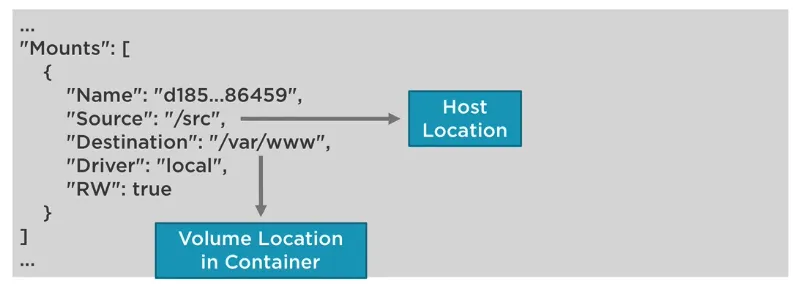
Run docker inspect to check it. The result could be:
Watching container logs
docker logs -f <container-id>Copying files from/to container
# from host to container (by the way, this works for kubectl too)docker cp <src-path> <container>:<dest-path>kubectl cp <your-pod-name>:<src-path> <local-dest-path>
# from container to hostdocker cp <container>:<src-path> <local-dest-path>kubectl cp <src-path> <your-pod-name>:<dest-path>